get-2.work · Recruiting · Recruitment Control Center
From the job ad to the chosen candidate.
Applicants, selection steps, interviews and the decision in one place — and the hired candidate continues in onboarding with one button. From there the Onboarding Control Center takes over: from the yes to the first working day.
Four steps in recruiting, one handover — and onboarding starts with the data already in place.
1Position
One form: role, unit, headcount, deadline. The selection steps come from a template — no workflow to design.
2Job ad
One click turns it into an ad with its own application page, link and QR code. You write the text once.
3Applicants
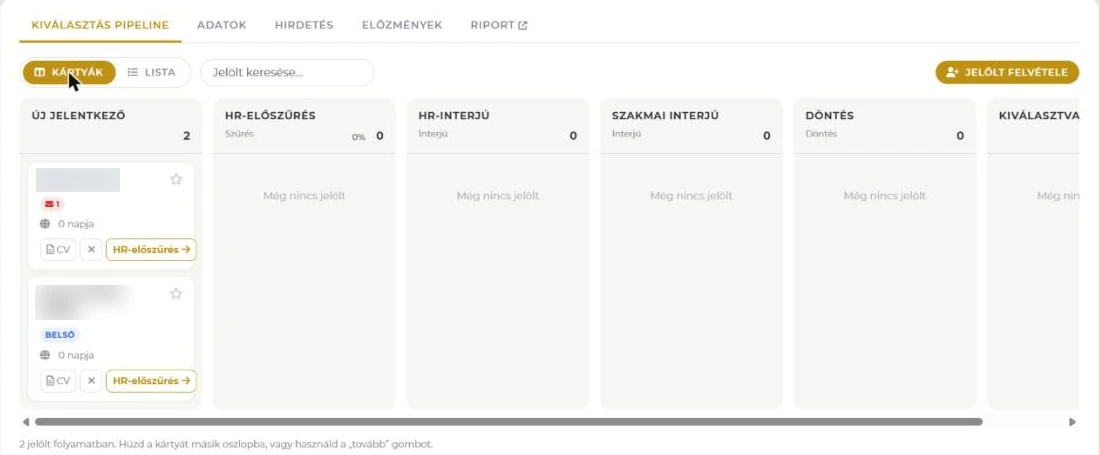
In columns, by selection step. You see how many are there and what share moved on.
4Selection
Screening, interview, manager review, decision — the system offers what belongs to each step.
5Hired
Start onboarding. From here the OCC takes over: offer, data, documents, preparation, first day.
The process doesn't break at leaving either: if a replacement is needed, the next search can start from the offboarding — a new position, with the data ready.
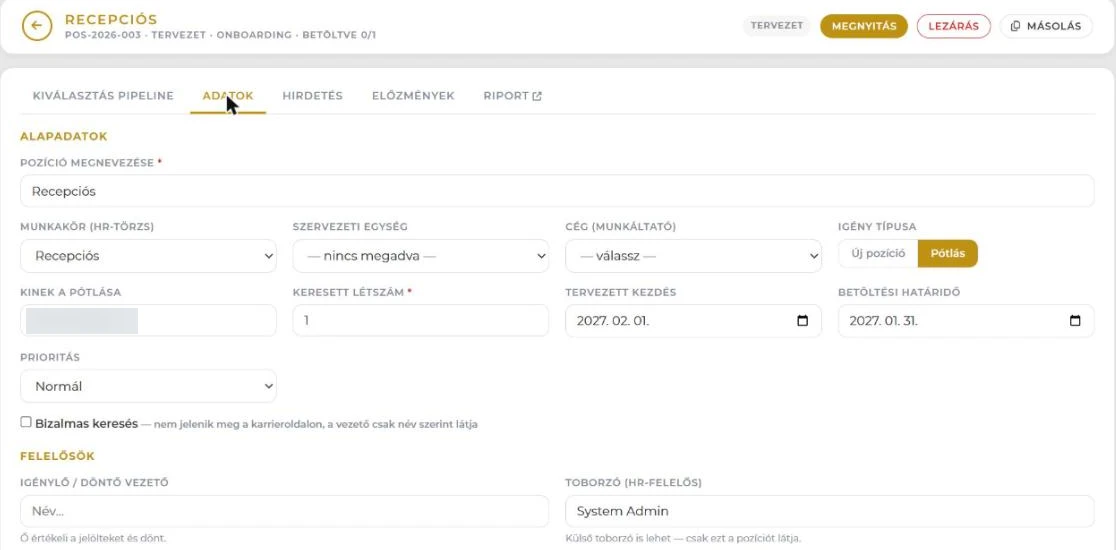
A position started from offboarding: its type is "Replacement", and it shows whose place we are filling.
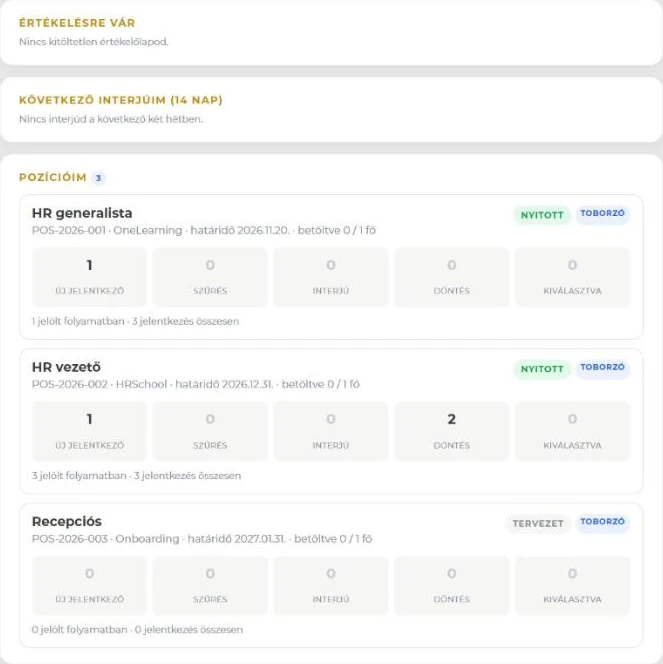
Morning: what's on my plate?
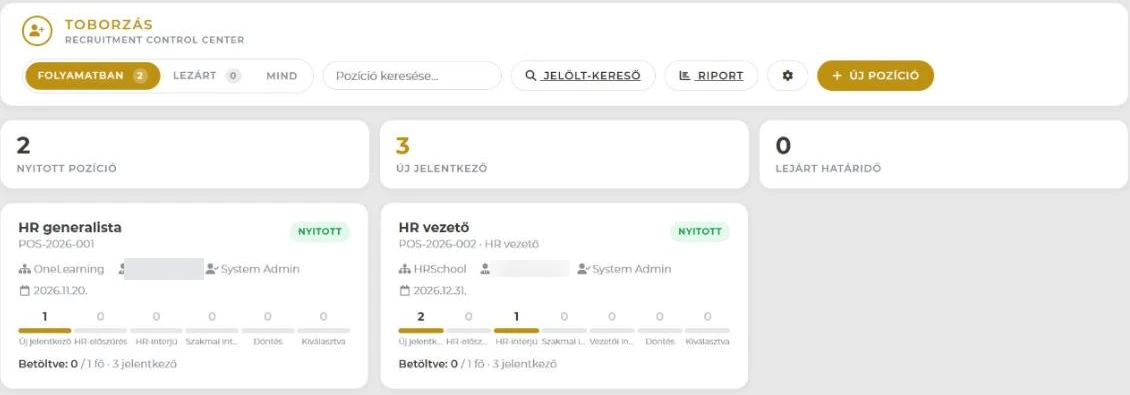
One page: how many positions are open, how many new applications came in, interviews this week — and a to-do list. No searching.
My to-dos3
Anna K. not screened for 3 daysWarehouse
The manager hasn't reviewed yesterday's interviewShift lead
The forklift ad expires in 2 daysJob ad
Every to-do is one click from the card where you deal with it.
The overview: open positions, new applicants, expired deadlines — and the headcount per step on every position.
A hundred applicants. One morning.
A warehouse position can draw 60–120 applications. Handling the volume is the daily tool here, not the exception.
96applications
65letters in one move
6interviews
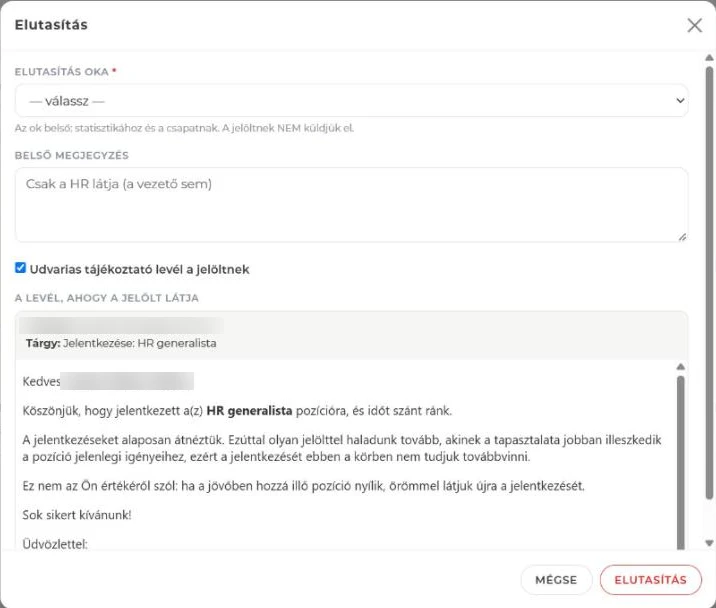
You select those who don't fit, pick a reason and a letter — and everyone gets their own personal reply. Ninety out of a hundred, decently.
A candidate can apply for several positions: one profile, a separate application and salary expectation per position. Someone who submits twice doesn't become two people.
You record the rejection reason with an internal note too — the candidate never sees it, the report does: you see why most people drop out.
The columns are the selection steps; every header shows the headcount and the share that moved on.Rejection: a reason from the list, an internal note — and the letter as the candidate sees it.
Managers don't have to learn a new system.
A manager sees only the candidates of their own positions — with the salary expectation, without the internal HR notes.
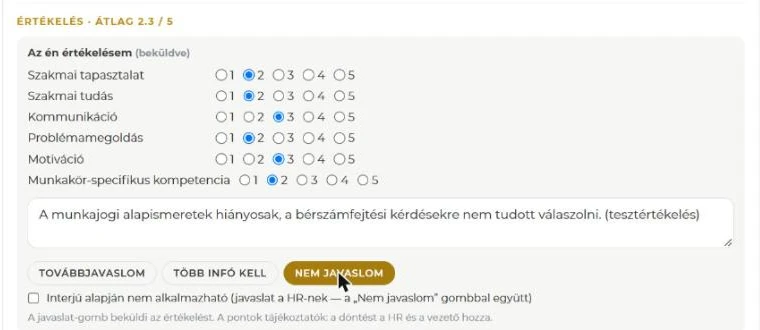
Scorecard · 1–5
Experience
Motivation
Communication
Team fit
Resilience
Overall impression
RecommendNeed more infoDon't recommend
For one candidate: profile, CV, a scorecard with six criteria, and three buttons. That is the manager's whole interface — it works on the phone too.
If they haven't reviewed two days after the interview, they get a reminder. At the decision, HR sees when the manager's review is still missing.
The manager recommends, HR decides: "Hired" and the "not to be employed" flag stay with HR.
Managers see only their own: candidates waiting for review, the next two weeks' interviews, their positions.Six criteria, one justification, three buttons — submitted.
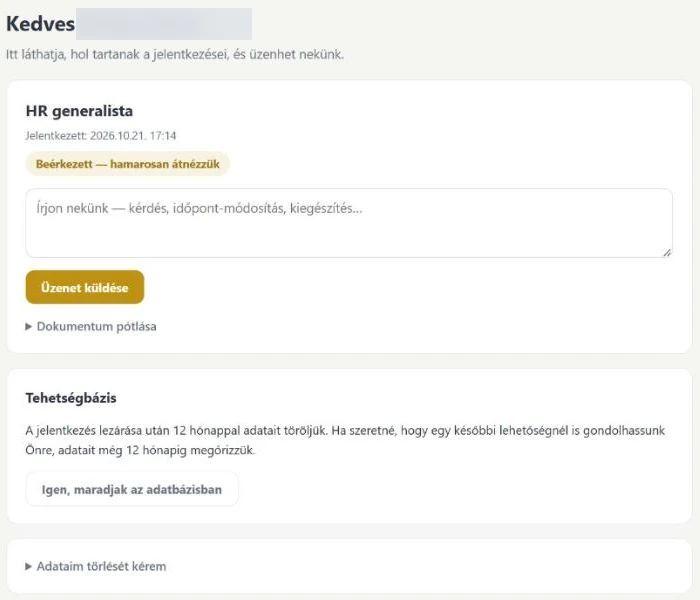
Candidates see where they stand.
On the link they receive when applying, candidates follow the status of their application — and see only what they need to see.
✓Received
✓In progress
Interview · Thursday 10:00
Decision
Ask a questionAdd a documentRequest deletion of their data
The candidate's page: where they stand, messaging, adding documents — and deciding about their data.
Where do they come from?
You write the ad text once. Every channel has its own link, so the source is recorded by itself.
Career page
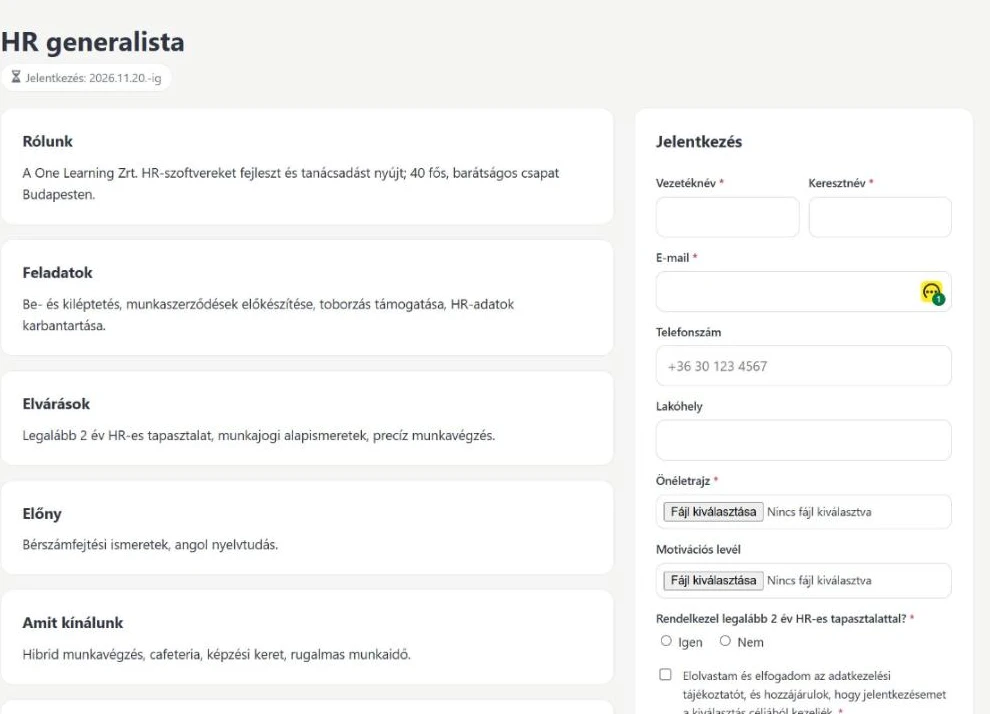
Its own mobile-friendly application page — with a link and a QR code, even posted at the gate.
LinkedIn
"Copy as LinkedIn post" — paste it, the application lands here, and the system knows where it came from.
Internal referral
An employee forwards their own link; the referrer's name stays with the candidate.
Internal openings
Logged-in employees see the open positions — internal moves run in the same place.
Agencies and internal postings get their own links too. The recruiting report shows which channel the people you finally hire come from.
The career page: the ad and, next to it, the application form — on mobile too.
The climax
Hired → Start onboarding
One button in the Selected column. A small window: planned start, unit, role, owner — done.
Start onboarding
Planned start
Unit
Role
Owner
Start onboarding →
The case opens in the Onboarding Control Center with the candidate's data and CV. The job offer is sent by the OCC — no second offer system, no export-import, no retyping. If the candidate has worked for you before, the system recognises the email address and opens the case on the former employee account.
On applying, the candidate accepts the privacy notice; the text and the time are stored. We provide the notice, filled in with the company's details.
Closed applications are anonymised automatically after one year; 14 days before, the candidate can extend by email ("keep me in the talent pool").
Candidates can request deletion of their data on their own page at any time.
Every export and every status change is logged.
"Not to be employed" — only after an interview
If it is clear from the interview that you would not want to employ someone, HR can flag it with a reason. The candidate doesn't know; they get the usual polite letter. If they apply again, HR sees a warning — the decision is still theirs, the system never excludes anyone by itself. The flag is deleted after one year.
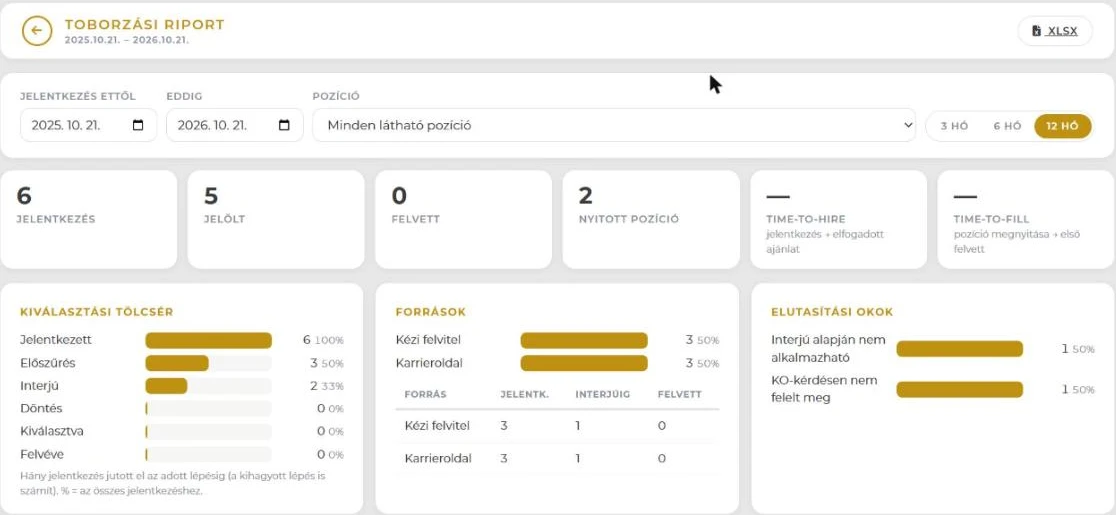
Recruiting report
Not by gut feeling — by numbers.
Funnel
how many moved on at each step
Sources
where the people you finally hire come from
Rejection reasons
why most people drop out
Time to fill
from the request to the accepted offer — the date comes from onboarding, so it is exact
Manager response time
how long passes between the interview and the review
Every table can be saved to Excel.
Funnel, sources, rejection reasons — filtered by period and position, exportable to Excel.
Frequently asked questions
What does the manager do, and what does HR do?
HR opens the position, handles the applicants, organises the interview and sends the letters. The manager sees the candidates of their own positions, fills in a scorecard and recommends with three buttons — from the phone too. The decision and "Hired" stay with HR.
Do we need a job board for it?
No. Every position gets its own application page and QR code; the ad can be copied into a LinkedIn post with one click, and the application still lands here. Internal referrals and agencies get their own links.
Can a candidate apply for several positions?
Yes. They have one profile, with a separate application and salary expectation per position. If someone submits the same thing twice, the system recognises it — they don't become two people.
How does the hired candidate get into onboarding?
With one button: "Start onboarding" from the Selected column — planned start, unit, role, owner, and the case opens in the Onboarding Control Center with the candidate's data and CV. The offer is already sent by the OCC.
What happens to applicants' data?
On applying, the candidate accepts the privacy notice. Closed applications are anonymised automatically after one year — before that the candidate can ask to stay in the talent pool — and they can request deletion of their data on their own page at any time. Every status change and export is logged.
Let's talk about how it would run for you.
A short conversation: which positions, how many applicants, which steps — and from when.